Digital Planner Mockups: Your Visual Marketing Toolkit
Standing out on platforms like Etsy or in a crowded blog feed requires more than just a great product; it requires great presentation. For creators of digital planners, the challenge is tangible: how do you sell a non-physical item? The answer lies in high-quality, professional mockups. These templates bridge the gap between your digital creation and the customer's imagination, allowing them to visualize the planner on their own device, filled with their own life. This is where the right Digital Planner mockup templates become an indispensable asset.
Why Professional Mockups Are Non-Negotiable
Think of your Etsy listing or blog freebie page as a digital storefront. A blurry, poorly composed screenshot is like a dusty, dimly lit window display. It fails to communicate value, professionalism, or the tactile appeal of a well-designed product. Professional mockups do the heavy lifting for you. They provide context, showcase features, and elevate your digital planner from a simple PDF to an aspirational tool for productivity and creativity.
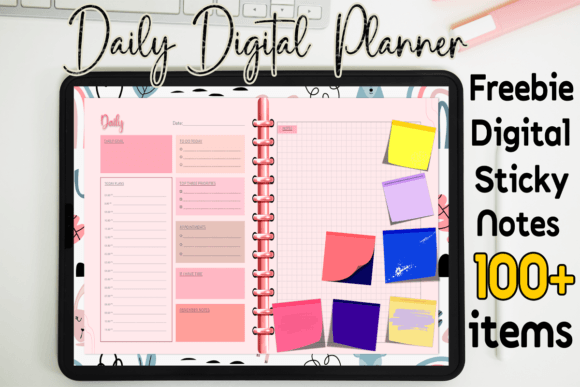
The visual characteristics of a good mockup are subtle but powerful. It’s not just about placing your planner on a tablet. It’s about the composition—the angle of the device, the soft shadows that suggest depth, the clean background that doesn’t compete with your product. The personality should align with your brand. A minimalist, flat-lay mockup with a coffee cup and a pen speaks to a calm, organized aesthetic. A dynamic, angled shot on a modern desk setup might appeal to a tech-savvy entrepreneur. This visual style directly influences how your digital planner is perceived, setting expectations for the user experience inside the app itself.
Where These Mockups Work Best
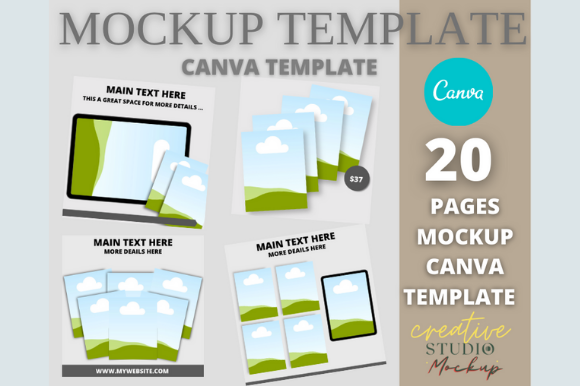
The true strength of a versatile mockup pack is its cross-platform utility. The primary use case is, of course, for Etsy listings. With 20 templates sized perfectly at 2280 x 1824 pixels, you have a month’s worth of unique listing images or can A/B test different visuals to see what converts. But the applications extend far beyond the marketplace.
- For Bloggers & Content Creators: Use a mockup to create a compelling hero image for a blog post about productivity systems. Offer a digital planner as a free download incentive for your email list, using a mockup to make the offer feel substantial and valuable.
- For Coaches & E-commerce Sites: If you sell a course on time management, a mockup showing your custom planner integrated into a workflow is a powerful visual aid. For e-commerce sites selling digital goods, mockups provide the necessary product photography for a non-physical item.
- For Brand Identity & Social Media: Consistency is key to brand identity. Using the same mockup style across your Instagram posts, Pinterest pins, and website banners creates a cohesive, recognizable look. It turns your digital planner into a recurring visual motif for your brand.
Integrating Mockups Into Your Design Workflow
The practical value of a template pack lies in its editability. These Canva-based templates are designed for efficiency. You don’t need to be a Photoshop expert. With basic Canva knowledge, you can customize them in minutes. The real power is in the customization. Change the background color to match your brand palette. Swap the device image if your target audience prefers an iPad over a laptop. Adjust the font on any accompanying text to align with your brand identity and typography system.
This flexibility is crucial for maintaining visual hierarchy. Your mockup should guide the viewer’s eye directly to your planner. A busy background or clashing colors will undermine this. By controlling every element, you ensure the digital planner remains the hero. Furthermore, using consistent mockups builds professionalism and recognition. When a follower sees your signature style on a new pin, they instantly know it’s from you, increasing engagement and trust.
Practical Tips for Choosing and Using Mockups
Not all mockups are created equal. When evaluating a pack, consider the variety of angles and scenarios offered. Does it include a mix of devices, lifestyle setups, and clean studio shots? This variety allows you to tell a different visual story for each feature of your planner. Always test the mockup with your actual planner file before purchasing or committing. Does your design fit the screen area naturally? Do the shadows and highlights interact realistically with your artwork?
Think about your font pairing strategy. If your digital planner uses a clean sans serif font for its interface, you might pair the mockup text with a complementary serif font or a subtle script font for headings to add a touch of personality without sacrificing readability. The mockup text areas are an opportunity to reinforce your brand’s modern typography. Remember, the goal is cohesion, not competition.
Beyond the Listing: Building a Cohesive Brand
Ultimately, a set of high-quality mockup templates is more than a time-saver; it’s a foundational design asset. It allows you to present your digital planner with the same level of care and professionalism as a physical product. This attention to detail signals to your audience that you value quality, which in turn elevates the perceived value of your offering. Whether you’re a seasoned designer or a passionate hobbyist, investing in versatile, customizable mockups is a strategic move that pays dividends in clarity, consistency, and customer confidence across all your creative and commercial projects.